
|
|||
|


 |
|

 |
|

| Home |
| About |
| Hobbies |
| Software |
| Hardware |
| ICT Hotlist |
| Purpose |
React:


ICT-Hotlist Topic
 Back to the ICT-Hotlist...
Business Continuity Management: Escalation procedure (ICT).
 Many ICT-departments modelled their management processes according to the
ITIL
(ISO 20000) standard and have a service desk/help desk process implemented that receives user incidents. In addition to
the automatic Asset management process to update the
CMDB
, a
NOC
function to check the availability of the network and their
attached devices is deployed. This
monitoring process can automatically generate incidents (tickets) for the service desk.
Many ICT-departments modelled their management processes according to the
ITIL
(ISO 20000) standard and have a service desk/help desk process implemented that receives user incidents. In addition to
the automatic Asset management process to update the
CMDB
, a
NOC
function to check the availability of the network and their
attached devices is deployed. This
monitoring process can automatically generate incidents (tickets) for the service desk.
As a result, user requests and various (computer) alerts (incidents) are received daily by the help desk to be serviced as fast, complete and correct as possible. Implementing the procedure below creates an additional filter to timely detect calamities.
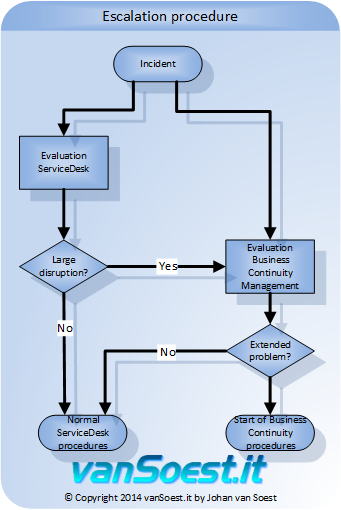
Picture 1. Implement the Business Continuity escalation procedure in normal ITIL Servicedesk procedures.
The Business Continuity Manager evaluates the incident, trends and decides if the Business Continuity procedures should be activated or returns the incident to the Service desk.
Also read:
- Business Continuity Management: an introduction.
- Business Continuity Management Example: selection process disaster / calamity preparation.
- Business Continuity Management Example: selection process failure preparation.
Glossary
- Calamity:
- A calamity mostly arises from an incident of external origin that expands across multiple hardware systems, software
systems or even employees. These incidents include:
- Fire
- Economic boycotts
- Epidemics
- Hacking
- Floods
- Sabotage
- Software errors
- Storm damages
- Failing software updates
- Failure:
- Briefly formulated a failure is a confined problem that relates to one program or one hardware component. Solutions for failures are mostly found in redundancy and high availability systems ( HA )
You may vote your opinion about this article:

Scripts and programming examples disclaimer
Unless stated otherwise, the script sources and programming examples provided are copyrighted freeware. You may modify them, as long as a reference to the original code and hyperlink to the source page is included in the modified code and documentation. However, it is not allowed to publish (copies of) scripts and programming examples on your own site, blog, vlog, or distribute them on paper or any other medium, without prior written consent.Many of the techniques used in these scripts, including but not limited to modifying the registry or system files and settings, impose a risk of rendering the Operating System inoperable and loss of data. Make sure you have verified full backups and the associated restore software available before running any script or programming example. Use these scripts and programming examples entirely at your own risk. All liability claims against the author in relation to material or non-material losses caused by the use, misuse or non-use of the information provided, or the use of incorrect or incomplete information, are excluded. All content is subject to change and provided without obligation.